My First Day Back On Twitter Results in a Shitstorm and Being Called a Dumbass

So today I reactivated my Twitter account after two weeks and right now I wish I hadn’t. Things started off ok as I participated in some dialogue about GoDaddy acquiring ManageWP.

After I published my article on the Tavern about the news, I received the following tweet.

The first thing that goes through my head is great, here we go again. PostStatus broke the story on September 3rd but I didn’t write about it until today. Since that post was published, both GoDaddy and ManageWP published posts of their own, sources I deem more official than PostStatus. I linked to ManageWP’s post and I linked to the Advanced WordPress Facebook Post that links to the article on PostStatus.

In writing the story, I felt like I didn’t need to link to PostStatus because it was a few days after the fact and it would be better or more accurate to link to the official sources of the news. Apparently, it’s known throughout the universe except by me that providing a hat tip to the first source of the story even days after it broke is not only a courtesy, but seen as good practice according to the AP.

So here I am in a shitstorm for not linking to a site. It could be worse, I could be dead. Had I written the article on the day of or over the weekend when PostStatus was the only source, I certainly would have linked to the site. The editorials I have to write that explain why I did or did not do something is getting fucking ridiculous.

I apologize for not linking to PostStatus in the post and crediting sites that break a story days after it happened is something I’m going to discuss with my fellow editor. Oh, and the cherry on top is that I was called a dumbass but I blocked the individual who said it so I can’t link to it here.

WordPress as the First Step to Learning Other Technologies

When I initially got involved in the WordPress project, I didn’t know a thing about open source. For all I knew, open source meant that the software was free and of poor quality compared to a commercial solution.

Fast forward several years and I truly understand what open source means. People from all walks of life contributing there knowledge to further a software project. This can be in the form of code, support forums, translations, bug reports, and a number of other things.

These days, I don’t look at open source projects as junk. Instead, I see them as opportunities for people and generally, the software is decent. Open source has come a long way in my time. Most of the open source projects used to be hosted on SourceForge which isn’t the case anymore for a number of reasons. Instead, GitHub is where I see a lot of projects being hosted.

WordPress has given me the opportunity to learn about PHP, CSS, dependencies, and several other technical subjects. As many others have found out, WordPress is a gateway drug to technologies used on the web.

If you want to learn about CSS pre-processors, PHP, open source software development, PHP, CSS, jQuery, JavaScript, dependencies, backwards compatibility, and more, you could do a lot worse than getting involved with the WordPress project.

Advice for Those Entering the WordPress Community

My name is Jeff Chandler and I’ve written about and have covered the open source WordPress project for 7-8 years. There is little difference between myself and those who have just entered the WordPress community. Just like any community of people, there are unwritten rules, things you must do to become well-known throughout the rest of the community. That’s just the way it is.

Unlike a lot of other people you may meet, I’m forgiving and willing to listen to your pitch and discover why it is you’ve chosen this path. However, if you decide to enter the WordPress community with guns blazing, be prepared to suffer the consequences. Like many other communities, there’s an inner, middle, and outer circle of influential people. Those who are closest to the WordPress project I feel are most influential.

If you enter the WordPress community these days with guns blazing, chances are that you’ll fail. The recipe for success is pretty simple. Sit outside the ring and observe how the WordPress community interacts for at least a year. There are nuances that people will have to understand and abide by, that’s just the way it is.

If you think you’re going to enter the world of WordPress and change the rules, you’re mistaken. Kudos if you think you’ll be able to radically change the direction things are heading, but it doesn’t work that way.

Learn how the WordPress community speaks, acts, views various opinions, and observe as well as follow the rules put into place before you enter the WordPress community.

It might sound like I don’t like those who show up unannounced and expect the world to change around them. How can anyone appreciate someone like that? If you enter the WordPress community, do your research, don’t act like you’re god.

Respect the decisions and guidelines that have been set forth before your time. If you disagree with them, use the appropriate channels but try not to fuck up things for everyone else.

The WordPress Planets Aligned For One Day

Yesterday, May 27th 2015, was WordPress’ 12th birthday. On this special day, I had the chance to celebrate with the co-creator of WordPress himself, Matt Mullenweg who was interviewed on WordPress Weekly.

I’ve interviewed a lot of talented, smart people in the WordPress ecosystem over the years but my favorite guest is Matt Mullenweg. He has a sense of humor, is intelligent, and knows more than I might ever know about the internals of Automattic and WordPress.

I enjoy interviewing him because it gives me the opportunity to ask questions no one else may know the answer too. For instance, status updates on projects that didn’t see the light of day. Or, acquisition announcements that didn’t produce the intended results.

I take a lot of pride in every opportunity I get to interview Matt. While he appears on several different podcasts and shows throughout the course of a year, I think my show is one of the few, if not the only that gets deep into WordPress specific conversations.

I have no problem holding Matt accountable for things that were said that didn’t materialize. There are reasons for why it didn’t and I see my questions as opportunities for him to explain why. He knows what he’s getting into when he comes on my show and I can’t remember the last time or if he ever explicitly didn’t want to answer a question.

I appreciate learning new things when he’s on my show and he doesn’t disappoint. Depending on the show, interviewer, etc. his interviews about WordPress can vary widely. I take pride in the fact that I ask him questions that the community is asking and also call him out on certain things when I feel it’s necessary.

All of this to say that I hope you listen to my latest interview with Matt to learn about WooCommerce, WordPress, the REST API, and a variety of other topics. If you know someone else who routinely interviews Matt about WordPress and gets more information out of him than I do, please share it with me in the comments.

Testing The WP For iOS Visual Editor

I have the WordPress for iOS app open and I’m checking out how the visual editor works. Im not sure what happened to the previous editor, but this is a much better writing experience than the previous version.

There’s even a toggle to switch between visual and HTML modes like the desktop version of WordPress.

salad for lunch

Salad for lunch

This was a yummy salad. Adding an image is a smooth process, but when it’s inserted, it takes up the entire editing window. It took a few tries but I was able to get underneath the image, past the caption point.

This is me testing the block quote feature.

Block quotes are infuriating because I can’t seem to block quote specific text and continue normal writing. It’s as if I’m stuck in this block quote and the only way out is to unblock quote all of the text.

It looks like adding block quotes has to be done after the post is written. At the very least, users will need to learn this quirk to block quote effectively.

  1. Testing numbered lists
  2. Two
  3. Three

That worked well, now bulleted lists.

  • One
  • Two
  • Three

That worked well. Now to add a link to my site, jeffc.me. Adding a link was easy. Outside of the block quote madness, this is pretty nice.

WordPress’ Road To 50% Market Share and A Few Thought Experiments

Last week, I had the fortunate opportunity to attend my first PressNomics event in Phoenix, AZ. I had a great time, even if I fell ill after returning home. There were a lot of great sessions packed with useful information, but the granddaddy of them all was the on-stage interview between Pagely CEO, Joshua Strebel and Automattic CEO, Matt Mullenweg.

Since that memorable interview which I’m still kicking myself for not recording, there’s been a lot of discussion surrounding Mullenweg’s thoughts on Jetpack and its impact on growing WordPress’ marketshare to 50% or more. Prior to his appearance at PressNomics, Mullenweg appeared on the KitchensinkWP podcast hosted by Adam Silver, where he discusses how feasible it would be to obtain 100% marketshare.

The next goal is the majority of websites. We want to get to 50%+ and there’s a lot of work between now and then. As the percentage increases, it gets harder and harder to grow the market share, and we have to grow the market share by doing things we haven’t done in the past – really thinking about the onboarding process, really thinking about the integration with social networks, and with how WordPress works on touch devices, which is going to be the predominant computing platform of the future. These things are going to be really important.

What got us here isn’t going to get us there. Once we get to 50%, we can decide something new we want to do.

During his appearance at PressNomics, Mullenweg said that he’s, “Worried we have become too much of an inward facing community and afraid to make a painful leap forward to make the next WordPress.”

Outside of a very long and detailed thread on the Advanced Facebook Users group (you have to be a member to view the thread), no one has talked about this statement. Granted, I’m sure the Jetpack and market share comments have overshadowed it, but it’s worth exploring in its own right.

The Next WordPress

For starters, what is the next WordPress? I don’t know and I don’t even think Mullenweg knows, but maybe he has an idea. We know mobile is likely involved, but it’s anyone’s guess after that. Who’s to say the next WordPress will be WordPress? If you’ve listened to Mullenweg in interviews or even during the State of the Word when he answers questions about the future of WordPress, he routinely brings up Theseus’ paradox.

The ship of Theseus, also known as Theseus’ paradox, is a thought experiment that raises the question of whether an object which has had all of its components replaced remains fundamentally the same object. The paradox is most notably recorded by Plutarch in Life of Theseus from the late first century. Plutarch asked whether a ship which was restored by replacing each and every one of its wooden parts remained the same ship.

An interesting thought experiment for sure. However, for it to take place means WordPress would need to radically change in the next few years, which brings me to the other part of his statement.

Inward Facing Community

This is a highly controversial statement, one that only he knows more about. However, I think several people on the Advanced WordPress Group were close with their interpretations. As the group is closed, I can’t cite the names of the individuals without permission so instead, I’m quoting from several different comments I agree with.

If you think the version of PHP is important at all, you’re not going to create the next WordPress, meaning the next thing that’s as big or impactful as WordPress is.

Not enough community outreach or venturing outside of the WP community for innovative ideas taking WP to the next level, which I’d have to agree with– if that’s what he meant.

Most innovation is done outside in, not inside out. But to be honest Matt, that’s where the problem lies too… The “inside” is very negative towards change, constantly throwing up hurdles… They like small incremental steps, but fear bigger ones… – Joost de Valk

These interpretations mirror my own in that, the people very close to the core of the project are looking inward and iterating in baby steps, blocking big changes/innovations from occurring from outside the community.

I’m not a core contributor, so I can’t confirm if this is the case or not, but it’s an attitude I’ve witnessed several would be contributors have towards furthering WordPress. It’s a complex situation that can’t be summarized in a paragraph alone. Part of me also thinks this is one of several reasons Mullenweg wants to lead another release of WordPress.

The Painful Leap

The only thing I can reference to the painful leap is WordPress’ backwards compatibility. After all, it’s only an 11-year-old software project (turns 12 in May). It’s one of the primary reasons it’s been able to achieve such a high market share. A look at the minimum requirements page tells you all you need to know.

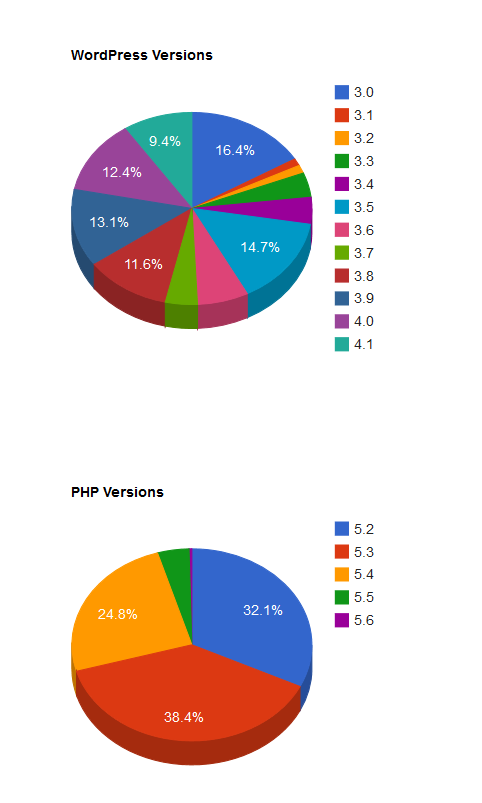
The charts on WordPress’ About page display WordPress and PHP versions in use are visual reminders of the sad state of affairs.

YUMMY WordPress Pie Charts!

YUMMY WordPress Pie Charts!

Supporting old versions of PHP continues to be a pain point for WordPress. However, according to one individual, worrying about PHP versions isn’t important if you’re creating the next WordPress or something that’s just as impactful.

If you think the version of PHP is important at all, you’re not going to create the next WordPress, meaning the next thing that’s as big or impactful as WordPress is.

The quote makes it seem like the next WordPress is likely to be some sort of SaaS offering like Wix, Weebly, or SquareSpace. When I wrote about what could lead to the downfall of WordPress late last year, a competitive service was not one of the choices. Now I think if anything were to disrupt WordPress, it would be a SaaS offering.

Outside of backwards compatibility, I don’t know any other painful leaps WordPress has to make in order to get to 50% market share. Perhaps Mullenweg could enlighten us with a listicle on his personal site.

A Few Thought Experiments

What got us here isn’t going to get us there. Once we get to 50%, we can decide something new we want to do – Matt Mullenweg

What processes and changes will evolve to get us there? How much internal friction will there be? It’s mind bending to think about what WordPress would need to be to people in order to gain 50% or more of market share. It’s a an enormous amount of websites/people and if WordPress can’t be all things to all people, who makes up the majority of a 50% market share userbase?

A Tipping Point For The Open Source Project Known as WordPress

In the past year or two, I’ve taken notice of a particular trend. That is, a lot of excitement surrounding the REST API being added to WordPress. When I attended WordCamp San Francisco last weekend, I talked to a few individuals who confirmed my suspicions. The WP API also known as the REST API will create an untold amount of opportunities for developers to interact with WordPress.

Everything from custom backend experiences to unique ways of interacting with WordPress data are possible with the REST API being added to the core of WordPress. While this isn’t slated to occur until WordPress 4.2 or later, there are projects already taking advantage of the API. FooCapture by FooBox is one example of a plugin tapping into what the API has to offer. FooCapture utilizes the Rest API in WordPress to capture, optimize, and upload screenshots directly to WordPress.

I follow the Drupal community and for several months, I’ve seen talk and examples of something called Headless Drupal. Basically, the backend of Drupal is nothing more than a series of API calls giving developers a chance to create a unique backend experience for clients.

While it doesn’t utilize the REST API, Jason Schuller’s Pickle Project is interesting. While it took him two days to complete, I can’t help but wonder what he would be able to create using the WP API when it becomes part of WordPress’ core.

I ended up speaking to a few individuals close to the WP API project and asked them several questions. Their answers solidified a suspicion I’ve had for a long time in that, the REST API is instrumental to WordPress’ future. We’re going to see custom backends, perhaps thousands of them.

We’re going to see the backend of WordPress used in ways we haven’t thought of or imagined just yet.  The next two years of WordPress news is going to be exciting. I have the opportunity to review a countless number of apps that will utilize the API in ways we don’t know of yet. The REST API being added to the core of WordPress is an exciting period of time. It’s a pivotal moment of the platform’s future.

If you disagree, I’m all ears.

My WTF Moments Using The New “My Sites” Interface

WordPress.com has unveiled a new interface to manage and access WordPress.com and Jetpack connected WordPress.org websites. In testing the interface, I encountered a few WTF moments. Here they are in no particular order.

The New My Sites Interface

The New My Sites Interface

Choosing Sites

The top item in the left sidebar is a dropdown menu containing all of the sites connected to my account. I can only select sites using this menu. If that’s the case, I don’t understand why so much space is dedicated to showing the cards on the right hand side. Alternatively, you should be able to select a site by clicking within the tile. It would also be nice to be able to move the tiles around as a means of organizing them.

What’s a WordPress?

I’m unsure if this is an error or if it’s supposed to say “Start a New WordPress”. Even for someone as experienced with WordPress.com and WordPress.org, I scratched my head trying to figure out what a WordPress is. It should either say “Start a New WordPress Site” or “Create a New WordPress Site” since the link takes you to the WordPress.com signup page.

Certain Links Don’t Correspond to The Selected Site

When I select a site, the Blog Posts, Pages, and Stats links don’t correspond to the choice. Instead, they point to my WordPress.com user account. My expectation is that these links are connected to the site I select. For example, if I select WordPress Tavern, the links should take me to the Tavern’s Blog Posts, Pages, or Stats.

Top Bar Confusion

The bar at the top of the website which contains the pencil icon, my Gravatar, and notifications area is tied to whatever site I selected. The connection is not obvious. I suggest using a tooltip that upon hover, tells me the action and the name of the site it will take place on. For example, if I choose WordPress Tavern, the Pencil icon in the top bar should say something like “Create a new post on WordPress Tavern”.

Contextual Menu Items

If I select a WordPress.org powered site using Jetpack, I shouldn’t see an Upgrades menu item. WordPress.com upgrades are the last thing that should be accessible when managing or quickly accessing a WordPress.org powered site.

Quick Dashboard Access

Instead of hiding the site’s dashboard link behind a gear icon, it should be added next to Stats and Customize.

The Gear Icon

During further testing, I discovered that the gear icon has a link to select the site. However, if you allow the user to select the site by clicking anywhere within the tile and a link to the dashboard is added to the tile along with Stats and Customize, the Gear icon can disappear. This saves users at least one mouse click to access the dashboard to whatever site they choose.

I’m no genius, but I am a user and this is what my experience is like using the new “My Sites” interface. It’s a work in progress like everything else on WordPress.com so I’m sure it will improve in due time.

I’ve Inspired People To Get Into WordPress?

Earlier this week, I was involved in a few different conversations where something like this was said, You’ve inspired so many people like myself with WP Weekly or You inspired me to get into WP. I find it hard to believe that someone like me could inspire someone to get into WordPress either personally or through WordPress Weekly. I just don’t think what I do is very inspiring to others but I’m routinely reminded that it is. Maybe this is a sign that I should take more pride in the work I do?

iThemes Announces Strategic Partnership With Crowd Favorite

Over the past few years, iThemes founder and CEO, Cory Miller, has structured the company, its culture and the way he does business around a memorable African proverb.

If you want to go fast, go alone. If you want to go far, go together.

As an example of that proverb in action, iThemes and Crowd Favorite have announced a joint-venture partnership. An advisory board with key executives from each company will work together to prepare iThemes Sync, Security, Exchange, and BackupBuddy to enter the enterprise market. Crowd Favorite CTO, Chris Lema, has yet to start his new job and is already creating lasting relationships between companies.

iThemes Continues To Mature as a Company

Go Far Together

Go Far Together

In late 2009, I published an article on the Tavern that highlighted iThemes response to speculation that the company was stagnating. Miller took the speculation to heart and responded to it on the company blog. I think his blog post in 2009 is one of the pivotal turning points for iThemes.

After that post was published, I sensed a renewed fire in Miller and the company began releasing innovative products such as Flexx and Builder. iThemes diversified its products by offering commercial plugins with PluginBuddy. The company also provided training through webdesign.com.

All of this to say that I’ve had the pleasure to watch iThemes mature as a company from the outside looking in. They’re moving, shaking, and making things happen by creating great products. The joint-venture partnership is yet another example of how the company is going far together, instead of alone.