Hog Heaven – Better Than Old Carolina?

Before my trip to Salt Fork State Park, I was given a suggestion to try out a place called Hog Heaven which is a BBQ restaurant with three locations, two of which are off of 77 South. My favorite BBQ joint in Ohio for the past two years has been a place called Old Carolina BBQ which I discovered during my trip to a local annual rib cook off. Old Carolina has great ribs but what has set them apart from the rest of the BBQ I’ve tried is their sweet sauce.

hog heaven in ohio

Since we enjoyed our visit to the first location located in New Philadelphia Ohio, we decided to visit their Canton location. During our first meal, I consumed a plentiful pulled pork sandwich. While the meat didn’t have any distinct flavor, the sauce is what made it pop. I can only describe it as ketchupy but with a sweetness to it such as honey or molasses. There is no spice to it what so ever and is the only sauce they have. I continuously found myself drowning my pulled pork in the sauce. During our second trip, I ordered a half slab of ribs. The first thing I noticed with these ribs is that when I picked up the bone to start eating them, the meat fell off without any of my assistance. This impressed me and told me these folks know how to cook a rack of ribs. The meat had a glaze of their sauce while also having a crispy texture to the top of the meat from the grill. These ribs were delicious. In fact, they were so good that now my fiance believes she has found a BBQ sauce that is better than Old Carolinas which we are still hotly debating.

While their Canton location is farther south than Old Carolina, it just might be that good for me to make the drive. I’ve found myself drinking from the sauce bottle as if it were Mountain Dew, it’s that good. While the new Philadelphia location was more like a biker bar, the Canton location was geared more towards a restaurant atmosphere. If you’re heading on I-77 South, stop by the Canton or New Philadelphia location for some excellent BBQ. Before the suggestion, I’ve never heard of Hog Heaven and now I consider it a hidden gem in Ohio.
Review Of The 23rd Ohio Bigfoot Conference

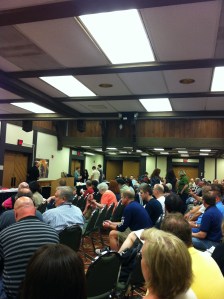
The 23rd annual Ohio Bigfoot conference hosted by Don Keating has come and gone. I didn’t expect the turn out to be as good as last year when Bob Gimlin showed up but alas, about 600-645 people were in attendance for this years event. I wasn’t too impressed with this years event mostly because of the speakers. The speakers that kept my interest the best was Ron Morehead as he explained what happened during the course of time that the Sierra Sounds were being recorded, some of Dr. Esteban Sarmiento’s presentation and last but not least, Eric Altman, director of the PA Bigfoot Society.

I found myself falling asleep a couple of times during some of the other presentations throughout the day mostly because I didn’t have a clue as to what the speaker was talking about. Lack of knowledge on my part but the dry speaking and lack of humor killed my attention span. Out of all the presentations, Eric Altman’s was the most interesting because it dealt with sighting reports that his group was either currently investigating or has investigated over the past 2 years. I wouldn’t mind if somehow, an entire hour or two was dedicated just for folks to get up and tell their story of their eyewitness account or could at least get a few more investigators to speak on what they have discovered via their own research. Although I doubt very many people would be willing to share their sighting reports to an audience of 600 people.

Unfortunately, Don Keating didn’t present on his investigations into the Ohio Bigfoot over the course of the year which is disappointing because I’m unable to make it to the Monthly meetings that he holds. It would have given everyone a heads up as to what’s been going on in Ohio Bigfoot wise. There was also some technical difficulties that at times, made it very annoying to be part of the audience thanks to the interference projected from the microphone. During one of the sessions, there was a loud audible clicking noise that we had to listen to for the duration of his presentation. It was easy to drown out after a while but still, made it hard to focus on the information he was giving out.

23rd ohio bigfoot conference

Attendees Starting To Fill The Room

Number 24 for Don is up in the air but if he decides to go through with it, I hope the speakers are geared towards more sharing of either personal sightings or accounts, sharing of information via their investigations or just a sampling of recent investigations that person or group has been on.

One of the reasons why I enjoy the Bigfoot conferences so much is because of the substantial discounted rates that the Salt Fork State Park lodge offers. For Friday and Saturday the rates were only $79.00 while staying Sunday was only $29.00. While I look forward to the Bigfoot conference every year, I’m equally content with enjoying a mini vacation in a beautiful park for a few days with my lady friend. Unfortunately, we were not able to hike our usual spots because of the miserable rainy weather over the course of the weekend. In fact, it’s been so wet that a lot of the plants that normally have giant flowers this time of year have yet to bloom or were just starting to. However, we were able to hike close to the lake before the start of the conference and before a heavy thunderstorm came rolling in.

Salt Fork Lake

Salt Fork Lake

Overall, I enjoyed my time at Salt Fork State Park despite the miserable weather. After all, I beat my fiancée 5 times in a row in air hockey (I don’t think she enjoyed that part of the vacation). I also won four incredible pieces of Bigfoot artwork for my office wall for $40.00 in an auction during intermission. I’ll be showing those pictures in a follow-up post. The event itself was free to attend and I got to meet up with a couple of old friends. Hope to see news soon of a 24th conference.

Phil Hendrie Backstage Pass Worth Every Penny

Someone at work turned me on to a guy named Phil Hendrie. I had no idea who this guy was, never heard of him until my co worker told me about him. Phil Hendrie is a radio personality that has a number of years of experience under his belt. He operates the world famous, Phil Hendrie show that is carried across different AM radio affiliates across the U.S. His broadcasts both audio and video are also streamed lived on his website pending you have a backstage pass. After purchasing my backstage pass for 6 months, I decided to go back in the archives and listen to some of the shows my co-worker told me about. He wasn’t lying. They are downright hilarious and as Phil mentions during every show, people just don’t get it and they won’t get it with just one episode. I’m not going to go into detail in how the show is performed but Phil is a multiple personality genius. It’s been a long time since I’ve heard entertainment this good. It’s affordable entertainment as well. Here is a few clips thanks to YouTube featuring Phil doing his Art Bell personality.

I highly encourage you to check out his affiliates page to see if he’s on the air near you.

The Blast Dot FM

I have no idea how I first came across this online station but I’m glad I did. It’s TheBlast.FM It’s a Christian rock radio station that plays progressive and aggressive tunes 24/7. I’m a fan of hard rock and this is right up my ally. Sure, a lot of the songs have religious sounding lyrics but it doesn’t affect the quality of the music.

I listen to the station for the good tunes, not for the religious aspects of it. I’d also like to mention that listening to music where NOT every third word is an expletive has been refreshing to my ears. Through TheBlast.FM, I’ve purchased music from bands such as RED, Skillet, Falling Up, Ever Stays Red, and Anberlin. I’ve yet to donate to the station but that will change in the near future. Colin Cruz is doing an excellent job with the station and I hope he keeps playing new, rocking tunes from these awesome bands.

I work best when I’m jamming out to TheBlast.FM.

Kiki James Leather Journal

KikiJames, a company based in London specialized in creating various hand made journals as well as diaries, guest books, address books, wallets and purses, etc. The journal that I picked up was a chocolate brown classic wrap journal. The journal is made out of Italian bridle leather yet it is smooth to the touch. Size wise, it’s about as big as a small book (4½”x3″). This particular journal is filled with 64 empty pages with no lines which enables you to doodle, writing down notes, pictures, etc. In my own opinion, the paper has an old fashion yellowish tint to it.

The only thing keeping me from using this Journal on a regular basis is the smell. My leather coat smells nice and I’ve smelled other forms of leather that don’t smell that bad but this particular piece of leather has a potent smell that I don’t agree with. It is very hard to explain exactly what it smells like. It is a combination of general leather and something else. That something else is what I don’t like.

This means I have a journal that I won’t be using and thus, would like to give away to anyone who is interested. All you have to do to qualify for the give away is to comment on this blog post. Then, after a few days I’ll announce the winner and send it off to you.

Before You Name That Baby

Ever wonder why there is so many people around you with the same name? I do. Thanks to NameTrends.net, I discovered that my first name “Jeffrey” was a name given to many baby males during the time frame of 1945-1993 with peaks in 1961 and 1968. I was born in 1983. That is quite a lot of Jeffrey’s.

NameTrends sources its data from the social security records which are publicly available and contains the national popularity of each of the top 1000 male and female names for each year since 1880. It also contains state-specific popularity of the top 100 male and female names for each year since 1960. The state-level popularity data is only available for the top 100 names in each state so keep that in mind when your browsing around the state map. NameTrends also provides visual data that allows you to see similar names or variations of names over time.

According to NameTrends, the following names were also popular during the same time frame:

  • Randy
  • Brenda
  • Wendy
  • Brent

Those names which were popular and began with the same letter as mine include:

  • Jacob
  • Joshua
  • Joseph
  • James
  • Jayden

Looking at the state by state popularity map for my name, I discovered that in 1983 (the year I was born) the closest I came to being number 1 in the top 100 names was Connecticut and Massachusetts, both ranked at number 17.

Considering I have already been named, it is not going to do me much good but I find it interesting how my first name was popular in the 1940s to the 1980s and now it has started to die off. I wonder if that is because of the baby boomer generation finally beginning to level off or if my name simply isn’t popular to use anymore.

Dive into the site and report back with your findings related to your name. The data is confined to U.S. residents only.

ScribeFire Reviewed

Well, this would be my second screencast produced out of Camtasia Studio 5 and I’m learning more and more that screencasts are the not the easiest things to create. I’m also trying to learn the magic recording/producing formula which will net me the best results on sites such as Viddler. It sucks to create something that looks so good on my local machine, only to have it look like crap on Viddler. But I think I’m getting closer to the magic bullet.

In any case, Brian asked me about ScribeFire and what it was all about. This screencast aims to answer that question while also providing an in depth review as to what this extension is capable of.

To get the best quality, select the option to watch the video at FullScreen.

ScrnShots Gone Social Or A SnagIt Alternative

ScrnShots Logo

Overview:

ScrnShots.com is a brand new service that is centered around uploading, tagging and then sharing screenshots. It’s also a clear indication that domains are getting harder to come by.

The Sign Up Process:

The sign up process for new members consist of your typical desired username, email address, password with the obligatory checkbox which gurantees ScrnShots that you have read their TOS as well as their Community Guidelines. No support for Open ID that I could fine.

After The Sign Up Process:

Finally, a service that doesn’t force me to confirm my email address to make sure I am who I say I am. Once logged in, you’ll see what looks like a user control panel. This control panel highlights your recent activity, popular tags, recent screenshots and stats along with RSS feeds to which you can subscribe to or share with others. These RSS feeds are for your Screenshots, Favorites and Contacts. Check it out.

Screenshot Of The Scrnshot Control Panel

Time To Take ScrnShots:

There two ways in which you can add scrnshots. The first is by uploading your image from your hard drive. The uploader supports the JPG, GIF and PNG file formats with a maximum file size of 5mb allowed. The second way is to use the ScrnShots Desktop tools which is in Beta for both Mac OSX 10.5 and Windows XP. For the purpose of this review, I’ll be using the Windows Edition of the ScrnShot Tool. The Windows version contains the following feature set:

  • Program lives in the taskbar which means its out of the way, but always there when you need to snap a quick screeenshot.
  • Select the area of the screen that you want to take a screenshot of.
  • Upload screenshots from existing files on your computer.
  • Describe, tag and add a url to images before uploading them.

The installation process was a breeze while the file size of the application was minimal. Great news for those of you who are already capped by your ISP. Upon starting the ScrnShots application for the first time, you are prompted to provide it with your username and password which is the same credentials you would use for the ScrnShots website.

Once installed, there will be an icon that will sit in your taskbar with the letters SS on it. Upon right clicking this icon, you’ll be greeted with a context menu which contains a number of options.

ScrnShot Context Menu

One thing I noticed right off the bat is that you can’t configure a hot key for this application. Instead, you have to right click on the icon in the task bar and select Take A Screenshot. However, after clicking on Take A Screenshot, the entire viewing area on your monitor (with the exception of your task bar) turns an opaque grey letting you know that the tool is active. Using your mouse, you can select any area on your screen in which to capture. Upon doing so, a dialog box will popup giving you the chance to configure a description, tag the image and then give attribution if necessary.

More Options To Configure

After The Upload:

After clicking the UPLOAD SCREENSHOT button, (notice how they used the correct word) the image is uploaded to your account on ScrnShots. From here, users can comment on your screenshot, embed your screesnhot or link to your screenshot. They can even add the screenshot to their favorites if they like it that much.

Here is what the screenshot looks like on the ScrnShot website.

A Scrnshot on your Scrnshot User Page

Here is an example of an Embedded ScrnShot:

Overall, this seems like a novice approach towards creating a social network through screenshots. Although I doubt this will put a dent in the userbase Skitch has, perhaps ScrnShots will tickle the fancy of someone looking for a different experience.

As for me? I’ll stick with my tried and true method of the SnagIt FireFox Extension.

The Ultimate URL Tester

Test Everything Logo

This perhaps might be the ultimate online URL tester I’ve seen yet. The online project which was created by Jonas John and is aptly named Test Everything gives end users a myriad of tools they can use to test various aspects of their URL. Everything from CSS and HTML validators to, Network tools to Web Proxies, just about everything seems to be covered in this group of tests.

To start things off, the website presents a text field where you can either type in your domain name, or an IP address.

Time To Test

Before you can initiate a test, you first have to select what it is you will be testing from the test browser below the text field. For starters, I’ve decided to use the CSS and HTML validators and selected the HTML/XHTML validator through validome.org.

Time To Validate

As you can see from the screenshot above, there are actually two pages worth of validators for this category. After selecting the appropriate validator, click on the Test website button. This will send the URL to test to the appropiate validator and will redirect your browser to the results page. I don’t want to publish my results here as they are pretty embarassing.

I noticed a strange anomaly while using FireFox 2.0.14 and this website. After I would choose the validator and click on the Test Website button, nothing would happen. However, in IE7 the site performed as expected. In fact, none of the buttons work in FireFox which is a disappointment as it’s usually the other way around. While writing this review, FireFox and this website are playing nicely with each other. I have no idea what is going on between the two, but it appears to be a hit and miss problem.

The project is based on the Yahoo! UI Library otherwise known as YUI as well as the Highslide JS and the silk icon pack by Mark James. If you notice a test that is missing but you would like to see added, Jonas has provided a suggest page that you can use to request that the service be added. If that weren’t enough, there is a Test Everything bookmarklet available which honestly seems to me to be pretty useless as the domain that is automatically inserted into the test everything box is Jonas’s domain. I would of rather seen my domain inserted into the box automatically or perhaps, a bookmarlet which gives me access to all of the testers from within my bookmark bar.

When everything is said and done, this is a pretty good idea of a website to harness the power of all of the various validation/testing services on the net into one central location. I think the testing interface could use a little bit of work, along with the bookmarklet but I believe I can see this site becomes an excellent resource for webmasters of all types. Perhaps someone can take the ideas of Jonas website and put them into a FireFox extension, unless that already exists which I would kindly appreciate a link to.

Another Mile Stone Reached

As it turns out,

Akismet has caught 10,023 spam for you since you first installed it.

It wasn’t too long ago when Akismet blocked the first 1,000 spam messages. In just a short time after that, it’s now 10,000. Next Stop, 100,000. And if the past is anything to go by, 100,000 will be reached in no time at all! Thanks Akismet for saving me a ton of time and hassle.